Construction: how orion watch moves a ticket
orion watch KEY runs Construction, the second phase of the AI-driven
development lifecycle. It works the tickets Inception
queued until each has landed on develop or needs a person. It sweeps once a
minute, and each sweep finishes work already in flight before starting
anything new.
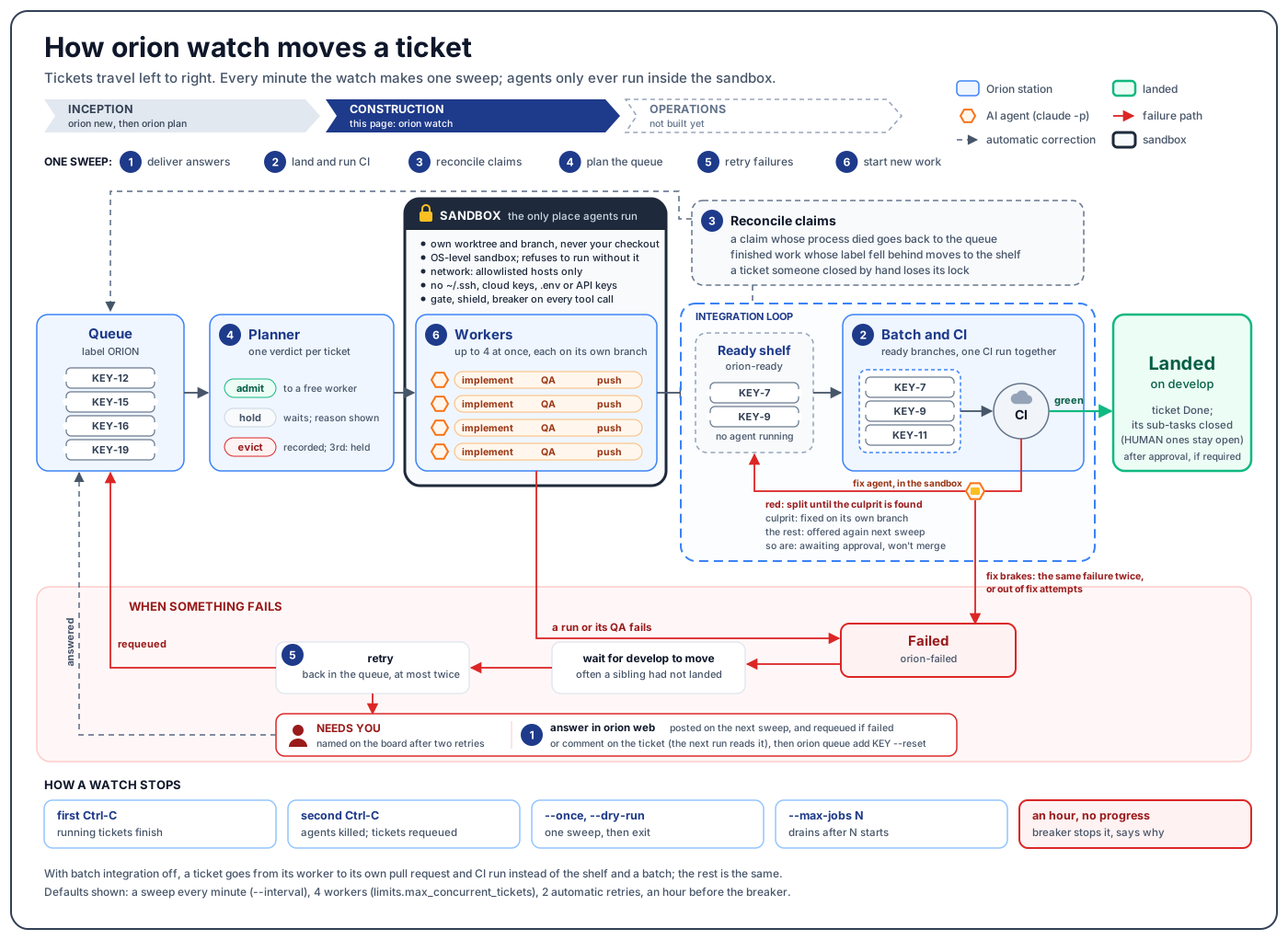
One sweep
The numbers match the badges in the diagram.
| # | Step | What happens |
|---|---|---|
| 1 | Deliver answers | Answers a person gave in orion web are posted to their tickets, and a failed ticket that was answered goes back in the queue. |
| 2 | Land and run CI | The integration loop: assemble the ready branches, test them together, land or isolate. |
| 3 | Reconcile claims | A claim whose process died goes back to the queue; finished work whose label fell behind moves to the shelf; a ticket closed by hand loses its lock. |
| 4 | Plan the queue | Every queued ticket gets one verdict: admit, hold or evict. |
| 5 | Retry failures | A failed ticket is requeued once the work branch has moved since it failed, at most twice. |
| 6 | Start new work | Admitted tickets are claimed into free worker slots, spread across areas of the code so parallel work does not collide. |
Before each sweep the watch also collects runs that have finished and releases held tickets whose cause has cleared: the check that failed passes again, or a person released the hold.
The planner
Each queued ticket gets one verdict per sweep:
- Admit sends it to a free worker.
- Hold makes it wait, with the reason on the board: blocked by a ticket that has not landed, a dependency written in prose, no fixVersion, superseded by another ticket, outside the open milestone, overlapping work already running, or no free slot.
- Evict removes a ticket that has tripped the breaker too often, run out of fix rounds, or been stranded too often, and records it. A ticket evicted twice is held for a person on the third attempt.
The tracker's priority and rank decide what goes first; the planner never
reorders the queue. orion prioritise KEY... reorders queued tickets in the
order you name them. It refuses tickets that are not queued, and a set whose
tracker priorities differ.
Inside one worker
Each worker runs one ticket from claim to push. orion work KEY [KEY...]
runs exactly this for named tickets, without a watch.
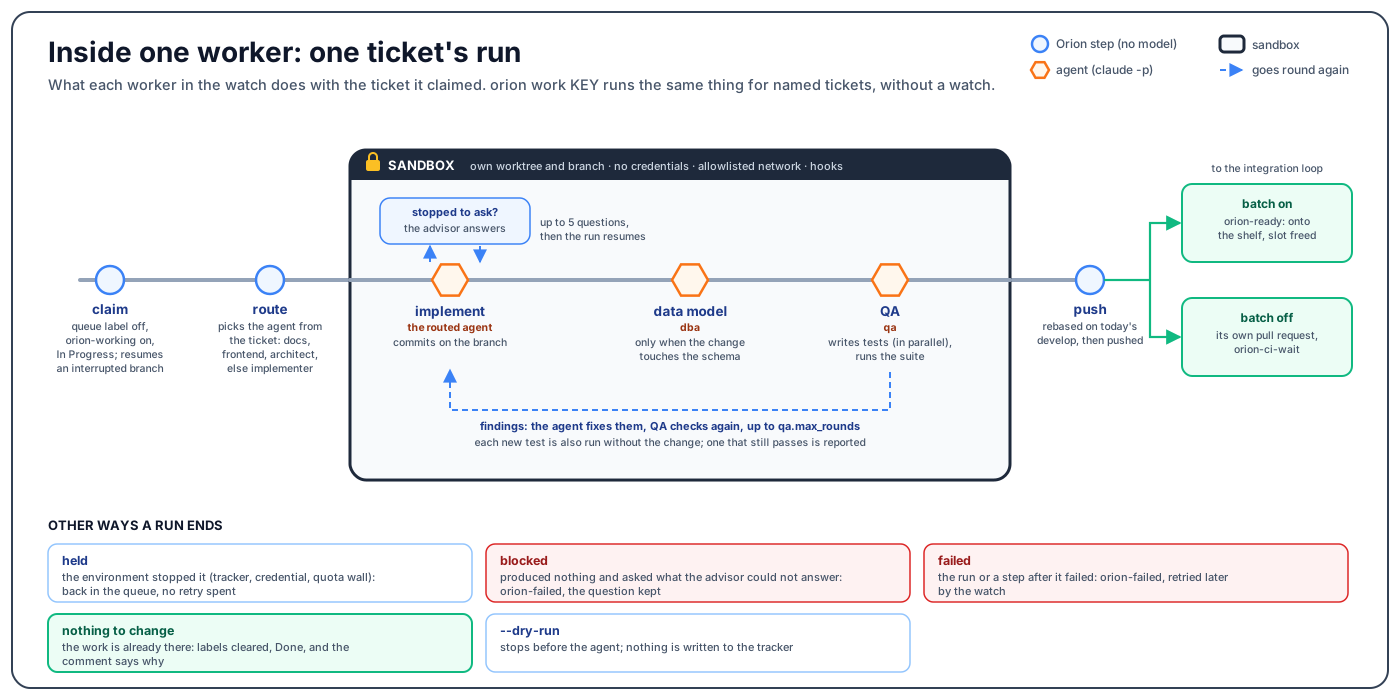
- Claim: the queue label comes off and
orion-workinggoes on in one write, and the ticket is assigned and moved to In Progress. If an earlier run was interrupted and left a branch, the run resumes on it. - Route: the ticket's type, components and labels pick the docs, frontend or architect agent when the ticket says so, otherwise the implementer.
- Implement, in the sandbox, on the ticket's own branch. The advisor, who sees only confirmed project artifacts, answers up to five questions the agent stops to ask, and the run resumes.
- Data model review, only when the change touches the schema. It runs before QA, so QA's tests are written against the schema that will ship.
- QA writes tests (case groups in parallel) and runs the repository's
suite. The agent fixes findings on the same branch and QA checks again,
up to
qa.max_rounds. Each test file QA writes is also run against the code before the change, and one that passes there is reported (QA and red before green). - Push: the branch is rebased onto the current
developand pushed. With batch integration on, the ticket moves toorion-readyand the slot is freed. With it off, the ticket gets its own pull request and waits inorion-ci-wait.
Routing
Routing matches exact keywords that planning wrote on the ticket; it reads
neither the summary nor a model. orion routes prints the table, and
orion queue shows the routing split of the queue before anything runs. A
ticket with no marker goes to the backend implementer
(ADR 0010,
Adopting an existing repo).
How a run can end without a push
| Ending | What it means | What the ticket gets |
|---|---|---|
| Held | The environment stopped it before any work: tracker, credential or quota wall | Back in the queue; no retry is spent |
| Blocked | Produced nothing and asked what the advisor could not answer | orion-failed, with the question kept |
| Failed | The run, or a step after it, failed | orion-failed; the watch retries it later |
| Nothing to change | The work is already there | Labels cleared, Done, and a comment saying why |
--dry-run | Stops before the agent | Nothing written to the tracker |
The integration loop
With batch integration on (the default for projects orion plan creates), a
worker that finishes puts its ticket on the ready shelf (orion-ready) and
frees its slot. No agent runs while a ticket waits there.
Each sweep then works the loop:
- Every ready branch is merged into one temporary ref. A branch that will not merge is ejected before CI runs and stays on the shelf.
- CI runs once on the set, so N tickets cost one run.
- A green set lands on
develop(rebased, or as a merge commit when a rebase is refused), after Slack approval ifslack.merge_approversnames people; with that list empty it lands unattended. Each ticket is closed, with its sub-tasks exceptHUMANones. - A red batch is split, both halves tested at each split, until the ticket that broke it is found. The rest are tested together again and land if green.
- The culprit goes to a fix agent, in the sandbox, on its own branch, with the failing CI log. Once the fix is pushed it rejoins the shelf for the next batch.
A green batch still waiting on approval goes round again on the next sweep.
A set that is red together but green in every part is recorded as stuck: its
branches stay on the shelf, but that exact set is not tested again until it
or develop changes (what to do). A ticket
leaves the loop as failed only when a fix brake trips: the same failure
twice, or ci.max_fix_attempts used up.
With batch integration off (collect.batch_integration), each ticket opens
its own pull request instead and waits in orion-ci-wait. Its CI, fix loop
and merge work the same way, one ticket at a time. In that mode, approval is
required only when slack.require_approval is on; otherwise Orion reports
that checks pass and a person merges on GitHub.
The design is in ADR 0011, ADR 0015 and ADR 0017; approvals are on Slack and approvals.
Parallel work
limits.max_concurrent_tickets sets the number of worker slots, 4 by
default; set it to 1 for a strictly sequential watch. The risks of
concurrency grow with the number in flight: git against one shared clone, a
budget checkpoint crossed by runs already going, tickets editing the same
files. That is why admitted tickets are spread across areas of the code.
Approvals still wait on one person, so N tickets finishing means N
approvals.
QA can also split one ticket's cases across several authors at once. On the
board that folds into the ticket's row as qa 2/5 ▰▰▱▱▱, and its tree opens
only when a child fails (ADR 0018).
Watching it run
orion watch KEY                # one project
orion watch KEY PROJ           # several; each is collected on its own pass
orion watch KEY --plain        # scrolling log instead of the full-screen view
| Flag | What it does |
|---|---|
--once | one pass, then exit |
--interval S | seconds between passes (default 60) |
--max-jobs N | stop after starting N tickets; without it the watch keeps starting work, and spending, until stopped |
--dry-run | start nothing; report what would run |
--plain | the scrolling log, even on a terminal |
--verbose | also print every tool call the agents make |
--max-minutes N, --max-turns N | per-run caps, overriding the defaults for this watch |
On a terminal, orion watch takes the whole screen, like top, and redraws
in place:
- The top panel has a summary header (what is watched and for how long; running, queued, landed and failed counts; the spend; the clock), then RUNNING (ticket, stage, elapsed time, the agent and what it is doing), QUEUE (how many are waiting, ready or blocked, and by what) and NEEDS YOU (only what needs a person).
- The log sits in the middle, newest at the bottom.
- While a batch is in flight, the bottom panel shows BATCH (its members and each step's time), CI (each check) and LAST (the last batch's result).
Every log row has the same columns: time, ticket, status, who, model, message. The status column says what kind of row it is:
| Status | Means |
|---|---|
start | a ticket was claimed; the message is its title and branch |
stage | a stage boundary; the message is the transition and who hands to whom |
working | an agent is running, and money is being spent |
waiting | a machine or a person is deciding (CI, an approval) |
done | a step finished, or a check passed |
skipped | deliberately not run; the message says why |
sent | a person or a channel was told |
setup | something to work in was made: a branch, a route, a sandbox |
note | worth reading once; nothing to do |
warning | worth a look; nothing is broken |
failed | broken; it needs a person or the next retry |
ORION_THEME picks the colours: dark (the default), light, or mono for
none. NO_COLOR implies mono. The scrolling log is used instead whenever
the output is not a terminal, with TERM=dumb, with --once or
--dry-run, or with --plain.
Every line also goes to ~/.orion/logs/watch-YYYYMMDD-HHMMSS.log, and when
the watch exits it prints the last 30 lines with the log's path. orion logs KEY has the full record
for one ticket.
When something fails
A worker whose run or QA fails, or a ticket that leaves the integration loop,
is labelled orion-failed. Then, without you:
- With
ci.auto_fixon (the default), a red build returns to the agent on its own branch with the failing run's log, up toci.max_fix_attemptstimes. An identical repeated failure stops the loop early. - A failed ticket is requeued when
developmoves, since the cause is often a sibling that had not landed yet. After two retries it is named under NEEDS YOU. - While a retry remains, the Slack notice of a CI failure mentions no one.
Only the last failure mentions the people in
slack.mention.
To answer a ticket under NEEDS YOU, either:
- Comment on the ticket, then requeue it with
orion queue add KEY --reset. The three most recent comments a person wrote reach its agents on the next run, under "NOTES FROM A PERSON ON THIS TICKET". - Answer in
orion web. The next sweep posts your answer to the ticket and, if it isorion-failed, puts it back in the queue.
For held, stuck or blocked tickets, see the Recovery runbook.
How a watch stops
| You do | Running tickets |
|---|---|
| First Ctrl-C | Finish their current run; nothing new starts. The watch names each running ticket, prints a line every minute while it waits, and exits when the last one is done. |
| Second Ctrl-C | Their agents are killed and the tickets go back in the queue: orion-working and the stage label come off. The tracker gets ten seconds, and any ticket it could not release is named. |
--once, --dry-run | One sweep, then exit. --dry-run starts nothing and writes nothing. |
--max-jobs N | After N starts nothing new starts; the watch waits for running tickets, then exits. |
| An hour with no progress | The no-progress breaker stops the watch and says what it was waiting on. |
Settings for the watch
| Setting | Default | Effect |
|---|---|---|
--interval S | 60 | Seconds between sweeps |
limits.max_concurrent_tickets | 4 | Worker slots |
limits.no_progress_minutes | 60 | When the breaker stops an idle watch |
collect.batch_integration | on for planned projects, off for adopted repos | Batches vs one pull request per ticket |
ci.auto_fix, ci.max_fix_attempts | on, 3 | The fix loop for a red build |
slack.merge_approvers | empty (no approval) | Who must approve a green batch |
All of them are on Tuning the guardrails, and every key is in the configuration reference.