What Orion is
Orion is an AI-native SDLC orchestrator: it turns an idea into a product.
It interviews you about the idea and plans it into a spec and a tree of
tracker tickets. Then it builds and tests several tickets at once, each in
its own sandbox, lands the tested work on develop in batches, and releases
it when a person approves.
Agents do the work and Orion decides what runs next. Each stage commits an artifact for the next one to read, and hooks that match rules, rather than an agent's judgement, decide what an agent may do. Orion follows Anthropic's AI-native SDLC playbook.
orion new "customers should see claim status in the portal"
                     # interactive: elaborates the idea, creates the tracker project
orion plan <KEY>     # spec, plan, scaffold, remote repo, ticket tree; resumable
orion watch <KEY>    # works the tickets and lands them on develop
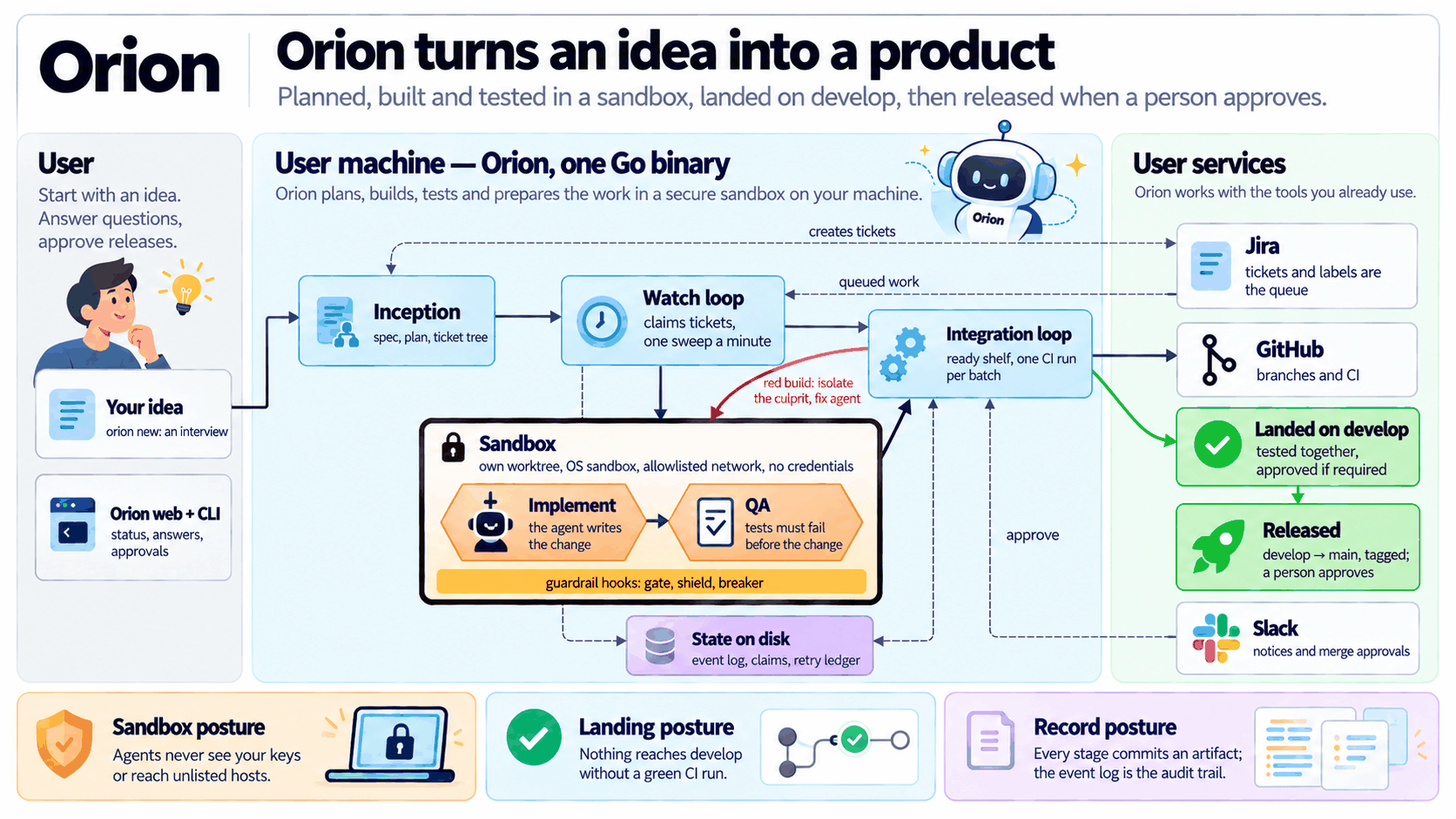
System architecture walks through every stage.
The artifact chain
planning:  docs/intent/<slug>.md -> constitution -> spec.md -> plan.md
           -> tasks.md -> tracker tree (Epic / Story / Task)
delivery:  ticket -> branch + diff + tests -> QA -> batch CI -> landed on develop
Each stage is a separate claude -p run that starts from the committed
artifacts, not from the previous stage's transcript. The commits double as
the record of what happened.
Where it sits in the lifecycle
| Phase | Orion |
|---|---|
| Inception | orion new, then orion plan: idea to queued work |
| Construction | orion watch, which runs orion work per ticket: tickets to develop |
| Operations | Not built. Incidents from a shipped product do not reach Orion. |
Guardrails and the sandbox
Three hooks, breaker, gate and shield, run on every agent tool call.
Each block message says what to do instead. Safety and limits
lists what each one stops.
Agents work in their own worktree, inside an OS sandbox with a network allowlist and no access to credentials. The sandbox is not a VM; The sandbox covers what it does and does not stop.
Orion is a binary rather than a Claude Code plugin because a hook only runs when an agent calls a tool. Enforcing wall-clock limits, killing a wedged process, sharing one budget across parallel runs and waiting out a quota reset all need a parent process. It has no cgo and no third-party Go modules, and it builds offline.
What you need
- The Claude CLI, git with
user.nameanduser.emailset, andghlogged in with permission to create repositories. - The nj-agents toolkit, which does review, secret scanning, test and build checks, PR writing and decomposition.
- macOS or Linux for the OS sandbox. Orion installs on Windows, but there is no supported sandbox there.
- Jira and Slack, optionally.
- Go 1.25 or newer, only to build from source.
orion doctor checks all of this; Install has the
steps. Inside Claude Code the same flow is /orion:start, /orion:next,
/orion:status and /orion:learn.
Status
Orion builds and passes its tests, and the hooks, doctor and workspace
provisioning have run end to end against the real binary. Read
Safety and limits for the known gaps before relying on
it, and the Roadmap for what is not built yet.
Start here
- Install: the binary, its toolkit and a clean
orion doctor - Your first idea: from
orion newto a running watch
MIT licensed. Source: NjAIAgents/orion. Release binaries: NjAIAgents/orion-releases.