Your first idea
Starting from nothing takes three commands: orion new to describe the idea,
orion plan to turn it into a spec and tickets, and orion watch to build
them.
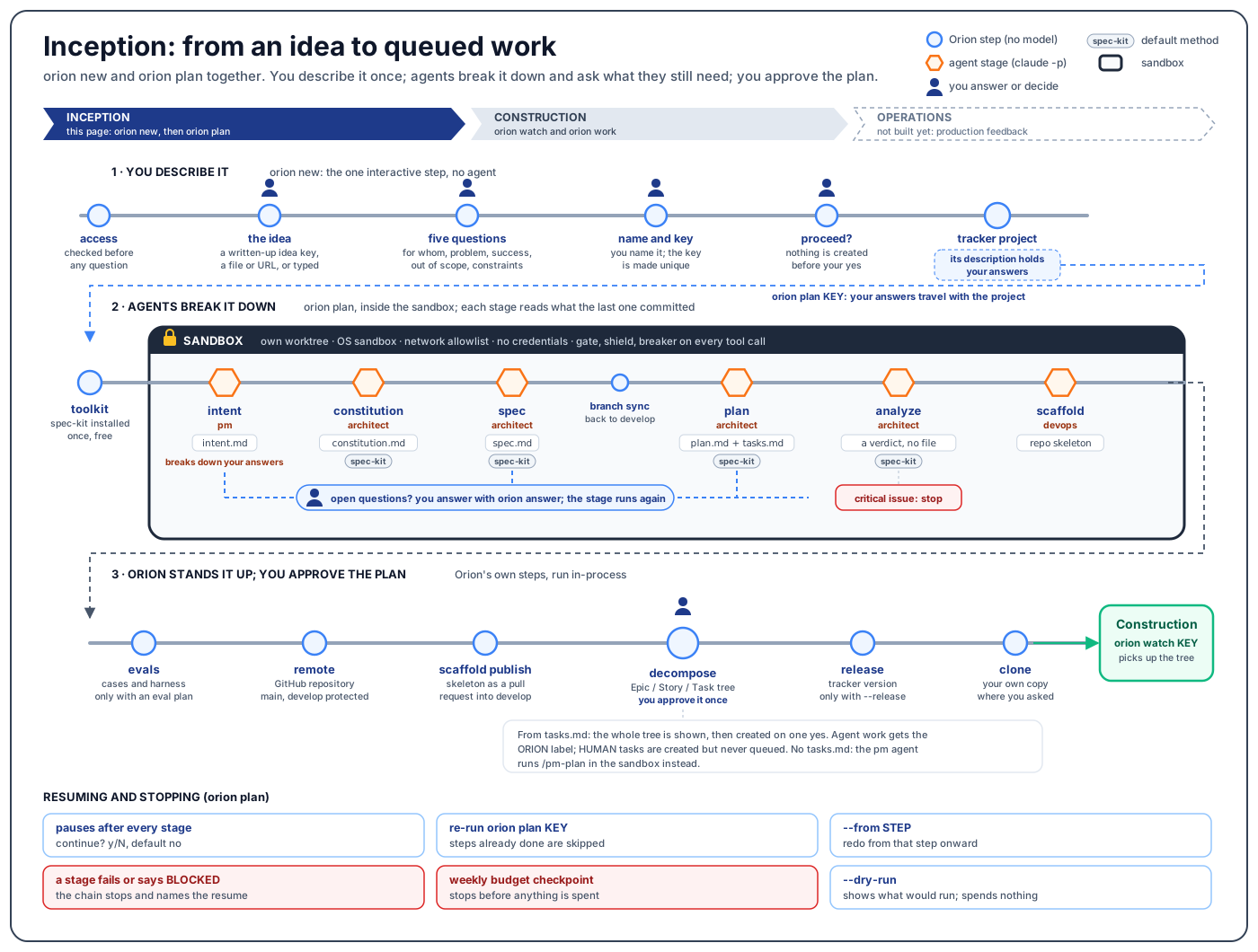
1. Describe the idea
orion new "customers should see claim status in the portal"
This is the only step that asks you questions, since every later stage runs unattended (ADR 0006). No agent runs here. Orion:
- Checks that your tracker account can create a project.
- Takes the idea as typed, from a file or URL (read word for word), or from the key of an idea already written up in the tracker, which skips the interview.
- Asks who it is for, what is wrong for them today, how you will know it worked, what is out of scope, and what constrains it. Press Enter to skip one; a skipped answer is recorded as unstated.
- Asks you to name the project and derives a unique key from the name.
- Shows the description, key and site, and creates nothing until you say yes. A Jira project cannot be deleted without admin rights.
The result is a tracker project and nothing else: no workspace, repository or
Slack channel. Its description holds your answers, which orion plan reads
as the statement of the work.
2. Plan it
orion plan KEY
Orion creates the project's workspace under ~/.orion, asks where your own
copy of the repository should go, then runs the planning steps in order. It
pauses after each step so you can read what it wrote; "Continue to the next
step?" defaults to no, and no prints how to resume. Running the same command
again picks up at the first step that is not done.
| Flag | What it does |
|---|---|
--from STEP | Redo from that step, for example after editing the spec by hand |
--dry-run | Show which steps are done and which would run; spend nothing |
--org NAME | Choose the GitHub account or organisation for the repository |
--release vX.Y.Z | Create that tracker version and put every ticket on it |
--yes | Off a terminal only: answer every pause yes. The web dashboard's Plan button uses this. |
Answer the open questions
Intent, spec and plan each list questions they could not
answer, and a stage with open questions is not done. Run
orion answer <id> to answer them, or mark each one in the file with [x],
~~strikethrough~~ or Answer: ..., then run orion plan KEY again.
Read the plan
Read specs/001-<slug>/plan.md (or plans/<slug>.plan.md
without spec-kit) before anything is built. Changing direction there means
editing a document, not a diff.
Approve the ticket tree
The decompose step prints the whole Epic / Story /
Task tree, + for new and = for already created, and one answer approves
all of it. Tasks an agent can do get the ORION label so the watch picks them
up. A task with a line starting HUMAN is created but never queued. The tree
is built natively on Jira; other trackers, or a plan with no tasks.md, use
your toolkit's /pm-plan.
The GitHub repository is created only after every earlier gate passes, so a
stopped chain leaves nothing to delete. When the chain finishes it prints
next: orion watch KEY.
3. Run the queue
orion watch KEY                # work the queue until you stop it
orion watch KEY --max-jobs 3   # start at most three tickets, then stop
orion watch KEY --dry-run      # say what it would start; start nothing
orion watch KEY --once         # one pass, then exit
Once a minute the watch claims queued tickets, builds and tests each on its
own branch in the sandbox, and lands finished work on develop.
Without --max-jobs the watch keeps starting work until you stop it. On a
first run, set --max-jobs and a weekly budget
(Budget and monitoring).
The first Ctrl-C lets running tickets finish; a second stops them and puts them back in the queue. Construction covers the rest.
You can do all of this from orion web too: its Projects page creates and
plans a project, and its Start work page starts a watch, with the same checks
(The web dashboard).
Next
- Inception: what each planning step writes
- A ticket's statuses and labels
- Budget and monitoring